Integrate Google Calendar with Slack for Team Updates

A shared calendar, like a PTO calendar, works best when the daily/weekly events are pushed to a Slack channel. This is how I do it for free, securely, and without needing to pay for a Slack bot/app.

  1. Add the calendar to your Google Calendar, usually as a webcal link.
  2. In Slack, connect your Google Calendar.
  3. In your team’s Slack channel, as Google Calendar as an App/Integration.
  4. Select the shared calendar and pick daily/weekly updates.

Posted in Desktop Apps, How-To | Tagged , | Leave a comment

Coding practices to prevent incidents and get through code reviews quickly

  1. Small try/catch blocks
  2. Precise Exception Catching
  3. Null Pointer Exceptions and Optional
  4. Return Early
  5. Lombok
  6. Avoid wildcard imports
  7. Log the exception
  8. AssertJ
  9. Verify complete and real objects

For inspiration, read more about Offensive Programming and Clean Code.

Small try/catch blocks

Small try blocks are easier to read and make sure the expected exceptions are coming from where they are expected.

Good

try {
    something();
} catch () {
    // exception came from something()
}

Bad

try {
    something_a();
    something_b();
    something_c();
    something_d();
} catch () {
    // where did the exception come from? 
}

Precise Exception Catching

Good

try {
    something();
} catch (ABCDException abcde) {
    // handle abcde
}

Bad

try {
    something();
} catch (Exception e) {
    // handle unexpected exceptions that will never be found, leading to bigger problems 
}

Null Pointer Exceptions and Optional

Don’t catch Null Pointer Exceptions. These should not happen and developers should use Optional and null checks if the object can be null. Catching them is awkward.

Return Early

Returning Early reduces complexity of the code, making reviewing easier. It removes else statements and brings the edge cases to the front of the method.

Good

// edge cases
if (!a) {}
if (!b) {}
if (!c) {}

// happy path
do_d();

Bad

if (a) {}
else {
    if (b) {}
    else {
        if (c) {}
        else {
            do_d();
        }
    }
}

Lombok

Project Lombok removes so much boilerplate code in Java, making the code readable, requiring less test coverage of generated code, and automatically updating methods when new variables are added.

  • Logger: @Slf4j
  • Builder: @Builder
  • Getters/Setters/ToString: @Data (read/write) and @Value (read).

Avoid wildcard imports

IDEs like to squash multiple imports into a single line: import com.abc.*. This saves minimal space and makes reading code without an IDE difficult. It also make the code vague, so turn off the setting!

Log the exception

Pass the exception to the logger so the entire stacktrace, message, and other fields can be logged. Plus, there is no String building required.

Good

log.error("Something bad", e);

Bad

log.error("Something bad: {}", e.getMessage());

AssertJ

Use a deep library like AssertJ that has more methods for comparison and reals more naturally.

Verify complete and real objects

Avoid being lazy and using any() or any(Object.class). These satisfy code coverage but miss the goal of unit testing: preventing regressions. Pass the entire object that you expect to receive.

Similarly, when asserting for correctness of the returned value, use isEqualTo() and check the entire object. When new fields are added, that unit tests will fail, requiring an update. For imprecise fields like time, AssertJ has isCloseTo().

Posted in Software Engineering | Tagged , , , , | Leave a comment

Keep Your Apps Updated: Overcome Deep Sleep Issues on Android

For Android power users that like to put apps into Deep Sleep, there is a side effect: apps won’t get updates from Google Play. Most of these apps are infrequently used. When they do get opened, the app developers may have pushed a change that forces updates. Personally, I have noticed this most with restaurant apps.

The fix is to download the Runner app (https://github.com/moneytoo/Runner). As the README describes, it opens all the apps on the phone, letting Google Play look for an update.

The gotcha is that once the screen turns off, the apps will no longer be updated. So you either need to keep touching your screen or increase the screen timeout to 10 minutes.

Posted in Android Apps, How-To | Tagged , , , , , | Leave a comment

Good Tech Blog: YAGRI: You are gonna read it

This rings true with my experience. I am happy having some extra metadata in my database tables. This allows for complex queries when doing backfills and incident analysis.

https://www.scottantipa.com/yagri

Posted in Tech Blogs | Tagged | Leave a comment

Good Tech Blog: Minimize Spillover in Agile: Break the Habit of Unfinished Work

I really like the side effects for this anti-pattern.

https://www.mountaingoatsoftware.com/blog/unfinished-work-every-sprint-three-ways-to-break-the-habit

Posted in Tech Blogs | Leave a comment

Good Tech Blog: Eats Safety Team On-Call Overview

Gives an overview of a health on-call rotation at a major company.

https://www.uber.com/blog/eats-safety-team-on-call-overview/

Posted in Tech Blogs | Leave a comment

Good Tech Blog: How Core Git Developers Configure Git

One place for all of the best ways to customize Git with explanations that lets you choose the ones you want.

https://blog.gitbutler.com/how-git-core-devs-configure-git/

Posted in Tech Blogs | Leave a comment

Good Tech Blog: When Imperfect Systems are Good, Actually: Bluesky’s Lossy Timelines

This is a unique article that explains how a system was designed overtime. Good for understanding iteration in system design questions.

https://jazco.dev/2025/02/19/imperfection/

Posted in Tech Blogs | Leave a comment

Risks of After-Hour Changes in Engineering

After hour system changes, like deployments, database migrations, infrastructure changes, etc, bring risks. They start as a way to limit an incident’s customer impact if something goes wrong, but introduce others. An immature engineering org will keep choosing the quick change over gradual investments.

The manual factor. After hour changes have long checklists. They are difficult to review and usually have a missing step. As a result, going off script can occur. Post change, monitoring during less traffic hours means… less traffic; less chances for a bug to be found until the high-traffic time comes.

The human factor. People like sleeping and are hesitant about waking others up. They are self-encouraged to go fast and skip some of the checks that take time. If they need help, they will page only when absolutely critical and response from the other teams will be delayed! They were sleeping!

Engineers should be ready to break their systems to reduce risk. Feature flagging and other methods can help minimize downtime. As the business expands globally, there will be less “after hours” available. It’s important that processes for risky changes are well-tested beforehand!

Posted in Software Engineering | Tagged , , , | Leave a comment

Risks of Ad Hoc Database Scripts in Engineering

Writing ad hoc database scripts might seem faster for modifying records than the more structured production code (like endpoints, cron jobs, backfills), but are we really convinced they are reliable? These scripts come with a host of drawbacks that can’t be ignored. It’s telling that mature organizations resort to using DB scripts only in the heat of active incident mitigation and resolution, having learned the hard way about the risks they pose, often as a lesson learned from previous incidents.

Never “one-time”

In my experience, db scripts always have a way of being reused and the next engineer inherits all of the below risks again. Instead with code, there is more structure and testing.

No application logs

An on-call engineer responding to an incident will first look at the logs for the effected entity and will find nothing. Junior engineers will be stumped while Senior engineers may think to look at Change Management tickets for potential outside sources for changes.

When updating records with a WHERE clause, the records impacted are even more difficult to identify afterwards. While the database table’s createdAt, createdBy, updatedAt, updatedBy, etc. columns may help, the updated* columns will get overwritten and this is not the first place that is searched.

No automated testing

How can reviewers verify that the database was set up to handle all use cases? How can the reviewers verify the output of the script? After pull request comments, does the author manually rerun all the test cases? If the script is reused, how will the next engineer replicate all of the testing? Did the author look at just the “expected” impact, or did he check all other tables too?

Bypasses service and DAO

Systems codify logic and checks into multiple layers. Services also have rate-limiting, locking to avoid database contention, and monitoring. DAOs know the acceptable Enum fields to insert. db scripts bypasss all safeguards.

Difficult to code review

Missing a statement in a WHERE clause can increase the scope of the change. DELETE records can easily CASCADE to other tables.

Visually, if a DB script inserting fewer than 100 records is difficult to review, anything beyond that will receive a no-look LGTM.

Gives Human Database Write Access

Humans make mistakes. They can miscopy a DB script. They can run the wrong script. They can miss a step in the change management ticket. Giving humans the least access is best.


Posted in Software Engineering | Tagged , , , , , , | Leave a comment

Block distracting websites with DNS66

The best way I found to block websites on my phone is to use DNS66. You can download it from the F-Droid app store (it is not on Google Play). It creates a VPN that will block any website on the blacklist.

Its original goal is blocking ads and trackers. It comes ready with multiple ad and tracker lists. New lists can be added, which is how I am blocking distracting websites.

It is better than similar products on the Google Play Store because:

  1. It is open source, free, and has no ads.
  2. It does not proxy web traffic. Blocking is all local.
  3. It does not require root.
  4. It is not going to try to steal your data.

To use it, you will create a text file and redirect websites you don’t want to 127.0.0.1. Or you could be funny and redirect to a good websites like wikipedia.org. I prefer to host my file online (like dropbox.com) and download it. Below is the file format.

127.0.0.1 instagram.com
127.0.0.1 www.instagram.com
Posted in Android, How-To | Tagged , , , , , , | Leave a comment

What to do when forwarding Gmail

I am in a situation where I use another email provider (protonmail.com) but cannot get rid of Gmail. Too many friends, family, and recruiters use my Gmail for me to actually delete it. I could use two email clients, but having one source for all my emails is just better. These are the tips I suggest for this situation.

Add a “special” Forwarding Address: Forward all new emails from Gmail to your new email address. For example, let’s say your new email is user@domain.com. I suggest putting a +gmail after user (user+gmail@domain.com). Your new email client can label and filter this specific email address now, letting you gradually update services with your new email address. Bonus suggestion is to select “delete Gmail’s copy” so you are not duplicating emails.

Settings > All Settings > Forwarding and POP/IMAP > Forwarding:

Turn off Gmail’s SPAM filter: All emails should be forwarded to your new email provider, but Gmail will not forward SPAM emails. Having double SPAM protection increases false positives. I recommend turning off Gmail’s SPAM filter so everything will get forwarded. There is no SPAM toggle in Gmail, so you need to make a fancy filter. You select all messages by doing a “does not match” a random GUID (or another log and unlikely text) and picking the action of “Never send it to Spam”.

Settings > All Settings > Filters and Blocked Addresses

Suggested by https://support.google.com/mail/thread/15558865?hl=en

Label big emails: Eventually you will want to export your emails to your new email provider. Gmail has a generous amount of email storage, probably more than your other provider. To avoid using up all your storage, filter out big emails so you can manually export them, delete them, or ignore them in IMAP. Creating a filter is straight forward.

Posted in How-To | Tagged , , , , , , , | Leave a comment

RSS Feeds from websites without RSS Feeds

RSS Feeds are great. You can follow all the online content you care about in one place. Emails of comic updates will not get buried and you can occasionally get updates from infrequent blogs, like this one. I personally use NewsBlur.com.

But some websites limit the RSS Feeds available and do not get specific.

For example, I enjoy reading Wall Street Journal (WSJ) Sports because they discuss larger trends in sports, rather than game highlights. WSJ only offers 6 RSS Feeds, with Sports sometimes being part of the Lifestyle feed. I want to get all updates for WSJ Sports.

There are multiple different solutions and all have limiting free versions. Some monitor a webpage and detect differences (like an image or text difference) and others require more user input. Some are RSS readers themselves and others just generate RSS feeds.

The best solution for WSJ Sports has been to generate a RSS feed using FetchRss.com. They will monitor 5 feeds (others do 2) and check daily (plenty enough for WSJ Sports). They only keep a 5 article history (not good for active websites) but NewsBlur does the article saving. If you want faster updates (up to the minute), all services will charge for that.

FetchRss uses CSS Selectors that the user needs to identify to generate the RSS feed. In a few months, the selectors on WSJ Sports has not changed, but this method is prone to breakages. The visual guide is good at picking out selectors without looking at code and will work mostly. Avoid using the selectors of articles in the Featured or the Top sections of websites, since then you will not get all the articles a website publishes (not the goal of a RSS Feed).

These are the selectors I am using for my feed and this is my WSJ Sports feed.

News item
#latest-stories > article.WSJTheme--story--XB4V2mLz

Headline
div.WSJTheme--headline--7VCzo7Ay

Summary
p.WSJTheme--summary--lmOXEsbN

Illustration
div.WSJTheme--lazy-load-wrapper--1TOawUTd

Posted in How-To | Tagged , , , , , | Leave a comment

Chai

When I tasted chai, wow, my life was changed. I have been adapting my chai recipe as I have learned from “chai experts” and experimented myself. The primary credits go to my mother-in-law Manju Agrawal.

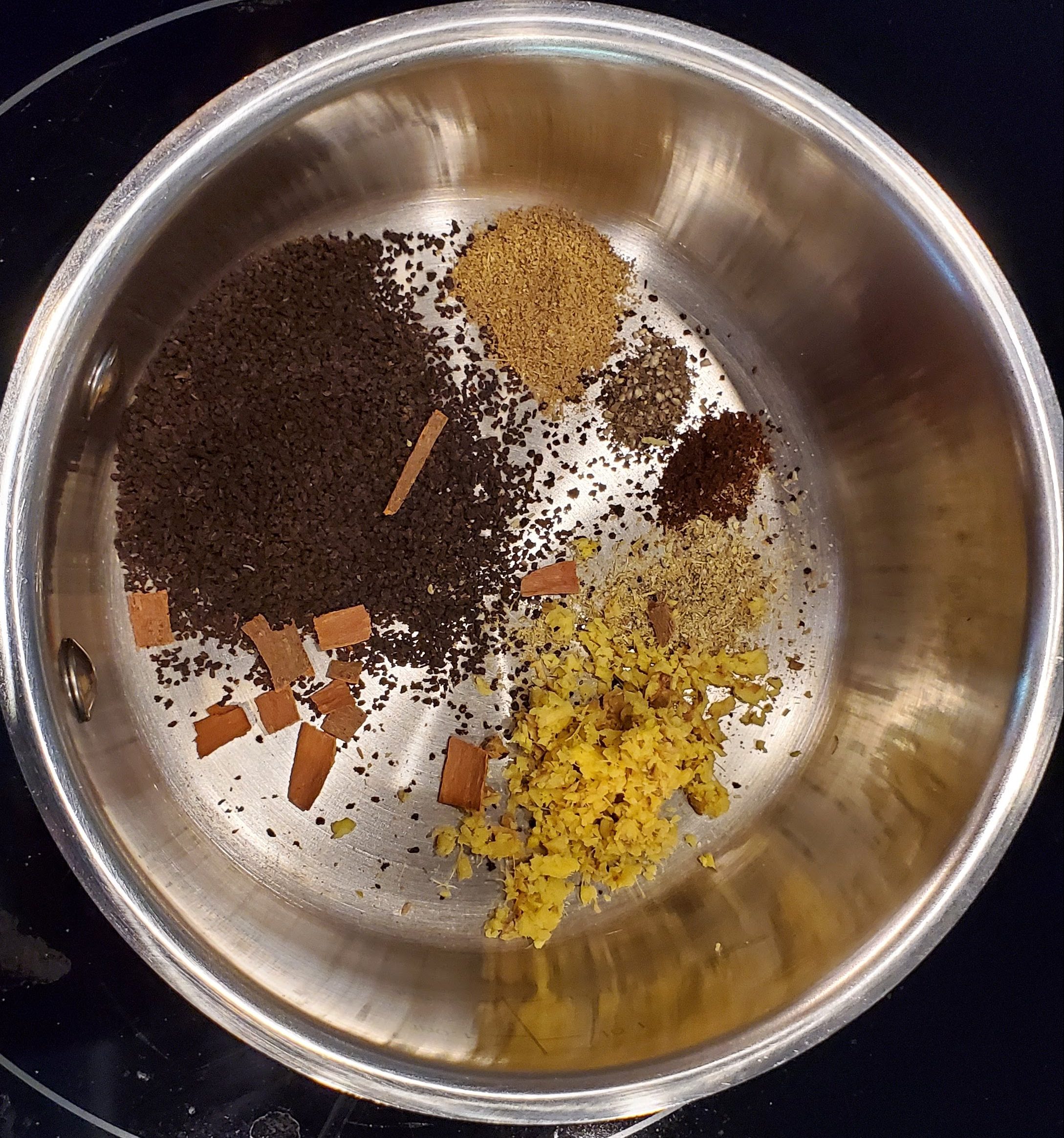
Chai is very customized for the individual and the region of India. I have included the default options along with bonus options.chai in pot

Serving Size

  • 1 large cup for 1 person
  • 2 small cups for 2 people

Utensils

  • Pot, Mug, Small Spoon

Ingredients

  • Required Ingredients
    • Water: 3/4 cup (adjust ratio with milk to your taste)
    • Chai: 2 scoops
    • Chai Masala: 1/2 scoop
    • Shredded Ginger: 1 scoop
  • Bonus ingredients (adjust per taste)
    • Black Pepper: 1/4 scoop
    • Clove: 1/5 scoop
    • Cardamon: 1/3 scoop
    • Mint: 1 scoop
    • Cinnamon: 1/2 stick
  • Phase 2 ingredients
    • Milk: 1/3 cup (adjust ratio with water to your taste)
    • Sugar: 2 scoops (adjust per taste)

Steps

  • Phase 1
    • Add water to the pot and turn on heat. Add in the required ingredients and your choice of bonus ingredients. Wait for the water to boil.
    • Bonus: wait for the water to rise
  • Phase 2
    • Add milk and sugar. Keep a close eye because the chai will rise.
    • Bonus: Wait for it to rise 3 times.
    • Hint: Put a spoon across the top of your pot to avoid boiling over.
Posted in How-To, Recipes | Tagged , | Leave a comment

Make an old laptop into a “Chromebook”

My father-in-law needed to use a web browser on an old laptop. He liked using Chrome, but Edge would open and not close. Random apps popped up and took up the screen. Windows 10 on an HP laptop was hogging memory with McAcfee and Windows Store games. He just wanted a browser and could not get that after a fresh Windows 10 install.

The “Chromebook” solution has been the right call. The computer boots up quickly and is always responsive. He gets his browser without the extra nonsense.

Chromebooks are maintained by Google, but the open source operating system is repackaged by Neverware into CloudReady. They have different versions, but the free version is the Home Edition.

To install, if you have a Windows computer

  1. Plug in a USB stick
  2. Download the installer and run it (~20 minutes to download the OS image)
  3. Move the USB stick into the destination “Chromebook”
  4. Boot into the USB stick.
  5. Play around with your “Chromebook” and then install by selecting on the bottom right of the Desktop, then “Install OS”.

If you do not have a Windows laptop, you need to manually do steps 1 and 2 on your own, but their website has instructions. It is similar to any Linux bootable USB stick.

Posted in Linux, Reviews | Tagged , , , | 1 Comment