Dunnet

By exploring the many features that Emacs has to offer, I found that of the games that for some reason come standard with it was a game called Adventure. The game is actually good for what I expected a text based game would be. This was actually my first text based game and likely my last since GUIs are my preferred gaming interface.

The instructions that are given are minimal so you are tasked with following the basic instructions while typing in commands to see if the game will recognize them. Guessing these commands are not hard because they are rather common place. You end up walking through a world described to you through descriptive paragraphs. East, Northwest, South, etc. are directions you can go and depending on the tools you have, you can dig or even log into a computer. You can get a shovel by saying take shovel, etc. I have not beaten the game so I will say it is hard to beat but easy to die:

I have lost the game by typing things like die or telling the character to fight bear. Be careful since dying seems like it is the easy thing to do. I highly suggest taking a shot at this game, it is really fun.

References

Posted in Reviews | Tagged , , | 1 Comment

CyanogenMod Updates for T-Mobile Samsung Galaxy S3

My T-Mobile Samsung Galaxy S3 phone did not automatically receive an update in quite some time. I looked on the dt2mo Wiki page and found that dt2mo had merged with other Galaxy S3 streams into the dtIte stream. I checked the dt2mo releases page and noticed that its development had stopped back in Feb 2014 so I was running with some relatively “old” software. The newer dtIte stream has very recent builds so I knew I was getting close.

I was still nervous though because my phone should have automatically updated itself. Searching the web to ensure that dtIte would replace dt2mo was not successful so I took a slight risk and proceeded. I first tried the super easy CyanogenMod installer from CM’s website but found out that during the installation the installer recognized my phone as a dt2mo and installed that software, which I already had. Since I had my recovery step up, I correctly installed the newest dtIte software by downloading the latest snapshot from the dtIte stream, copying to my phone’s internal storage, and executing it from recovery. Interestingly, the phone was updated rather than factory reset, so that was nice.

In conclusion, dtIte is the continuous of dt2mo and successfully installed onto my phone.

Posted in CyanogenMod, Reviews, Samsung Galaxy S3 | Tagged | Leave a comment

OwnCloud, 403 Forbidden, and Shared Folder

403 Forbidden. That is a webserver’s way of telling someone does not have permission to a file or folder they are trying accessing. When I saw this in an OwnCloud desktop sync client, I was confused because the user should have the ability to upload new files to their directory.

The issue I discovered was that the user was trying to upload pictures into the “Shared” folder. In OwnCloud, the Shared directory is not as much a folder as it is a location of tagged ‘Shared’ folders. This translates into the “Shared” folder does not exist and therefore the user cannot upload to it. Obviously at this point, this was causing the 403 Forbidden error.

The solution is to tell the user to move their files into a folder they own and use the web interface to share the files with their intended audience.

Posted in How-To, Nextcloud/OwnCloud | Tagged | Leave a comment

Bitcoin ASIC Miner on Linux

Getting an ASCI Bitcoin Miner to run on Windows is straight forward but getting the correct drivers and terminal commands down to run it is actually more difficult than one would think. So, I would suggest sticking to Windows but if you have an extra Linux machine laying around that you are going to keep on all day, then getting the ASIC miner to work is worth it.

This post has the crucial steps to getting your miner up and running: http://talkaboutbitco.in/setup-asicminer-usb-block-erupter-linux/

It is rare that you will get all the steps to work successfully your first run through so here are some pointers if you get stuck:

  • Step 2 – If you are getting errors when trying to do an apt-get update, Step 3 will fail. On your computer, navigate to System Settings > Software Sources. Explore here and remove the sources that apt-get update complained about in the terminal. Additionally, you can update your “Main” mirror to a faster mirror.
  • Step 4 – Make sure you are in your home directory otherwise bfgminer will be installed somewhere strange. (In your terminal, “cd”)
  • Step 5 – cd bfgminer
  • Step 6 – 8 – Hopefully runs with no errors. I was lucky but you might not be. If you fail, you likely did not install everything needed in Step 3.
  • Step 9 – Not too easy because I was receiving “too many arguments.” These are the basic ones you will need but keep the quotes: ./bfgminer -o “your pool here” -u “your username here”  -p “your password here”
  • Step 9 – If no devices are found, follow the prompts and press M then +. In another terminal, type ls /dev/ and find the device that begins with ttyUSB. Let’s call it ttyUSB?. Mine was ttyUSB0. In the bfgminer terminal, input the location and press enter: erupter:/dev/ttyUSB? This should be successful with the terminal changing to indicate the found device. Press enter again and your device will start bitcoin mining!

Sources:

Posted in Bitcoin, How-To, Linux | Tagged , | 1 Comment

Hard drives do die

Hard drives are made cheap but with lots of storage. They are not made to last forever but when hard drives seem so reliable, a dead hard drive can catch many people (including myself) off guard. Hard drives will die and being prepared for their death is important. While setting up a RAID system would be ideal, not everyone has the budget, knowledge, and time to set it up. I thought buying a swappable RAID hard drive system would be cheap but they were in the hundreds.

After searching around for good ways to ensure your data is safe, here are my best tips:

  • Have a backup of your backup
  • RAID 1 is reliable and cheap, but RAID 5 or RAID 10 is more practical and used more in industry.
  • Incremental backups prevent data corruption.
  • Have an off-site (on-line service or hard drive stored at a friend’s house)
  • On-line services can fail and typically are have direct access to the original data.

So, when my hard drive died, I emailed Cavalry (the hard drive manufacturer) and received the below email. It shows that hard drives are cheap and will die. The last line is great and hits home.

Cavalry Email from customer support:

We feel very sad whenever a drive dies in the field. It looks like your drive has failed. We recommend you to search for “data recovery” online if that is what you desire to do. There are many companies offering this type of service. If you want to try to read the data, the following describe the basics of any external HD.

There are two parts in an External HD. One is the bare drive, and the other is the PCBA bridge in the enclosure. If the bare drive is good, you can still use the bare drive. We recommend you to obtain a HD bridge which will allow you to use any bare drive as external without installation. Example of a HD bridge: http://www.amazon.com/Cavalry-CABD3BRP-Y-Bulldog-Docking-Protector/dp/B003UT91B2/ref=sr_1_1?ie=UTF8&qid=1326562501&sr=8-1

Hard drives are made cheap and with a limited lifetime. Your data can be priceless, please keep your data in multiple drives.

Posted in Reviews | Tagged , , | Leave a comment

Review of Powerline for Wifi

I learned that Wi-Fi range extenders, repeaters, and amplifiers are all different and use different technologies. From first hand experience, using any of these that take an existing weak wireless signal and send them out again will result in poor performance. Not only will the packet need to travel twice over wireless, but you can not get faster than where you place your wireless amplifier/etc device. If your router does not support WPS (like my Verizon router), you will end up with two network SSIDs, a nuisance.

The best solution by far for getting a stronger signal in somewhere else in your house besides running new Ethernet cables is using Powerline technology. It sounds sketchy but it is anything but sketchy. It actually uses the existing electrical wiring in your house to act as Ethernet cable, hence making any electrical outlet a possible Ethernet wired connection and second Wi-Fi hotspot.

My results using the device below were 30 Mbps up/ 30 Mbps down when plugged directly into the router. When two floors up and across the house, I received 27/27. Rather impressive.

TP-LINK TL-WPA4220KIT: http://www.amazon.com/gp/product/B00HSQAIQU/ref=oh_details_o00_s00_i00?ie=UTF8&psc=1

Posted in Reviews | Tagged , , , | Leave a comment

Remove the soccer on the Soccer Team Template on Google Sites

Google Sites has some nice templates. If you are building a site for your sports team, then you probably selected the Soccer Team theme and were happy with the look and feel of the site. If you are not a soccer team though, you will have trouble removing the soccer balls everyone. I was able to successfully do it so here is how to do it.

Your site will look like this when you start off but you do not want those soccer images everywhere!

ImageTo get rid of most of the annoying images, go to Site Settings (circular screw image) and select Manage Site.

2

In the left menu bar, select Themes, Colors, and Fonts.

  • The minimum you will have to do is change the 3rd radio button below for Background>Wrapper Image to Theme or None to get rid of the background of the soccer player’s leg.
  • I suggest setting everything to Theme so you can use Google’s color themes to get a nice looking website.
  • Be sure to notice that there are two columns of settings that you should to Theme to take advantage of themes.
    • The first column below is Entire Page, Site Header, etc..
    • The second column is Background, Text, etc.

3

Some other websites suggested deleting the actual image files located in Attachments. I DO NOT suggest this because your website will have broken image links everywhere, which is not pretty to look at. Do as you please.

4

You should those find the image that is favicon.ico and change that to another image of your choosing, probably the ball that you use in your sport. The favicon is the picture that appears in the tab in your web browser.

10

Great right? Nope! The other helpful links I found online did not explain how to get rid of that soccer ball in the header. Even deleting everything in attachments did not do it.

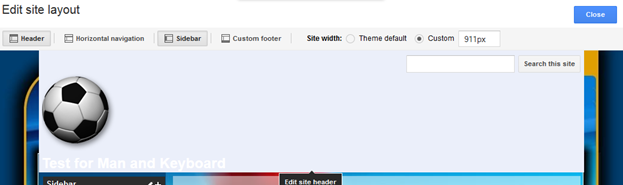
To get rid of it, go back to your front page and select Site Settings (circular screw image) and select Edit site layout.

5

Hover your mouse over the header and click on it.

6

For Select Logo: you can Attach a file or select No logo. I also suggest to Use theme default value for the Height to avoid a funny looking website.

7

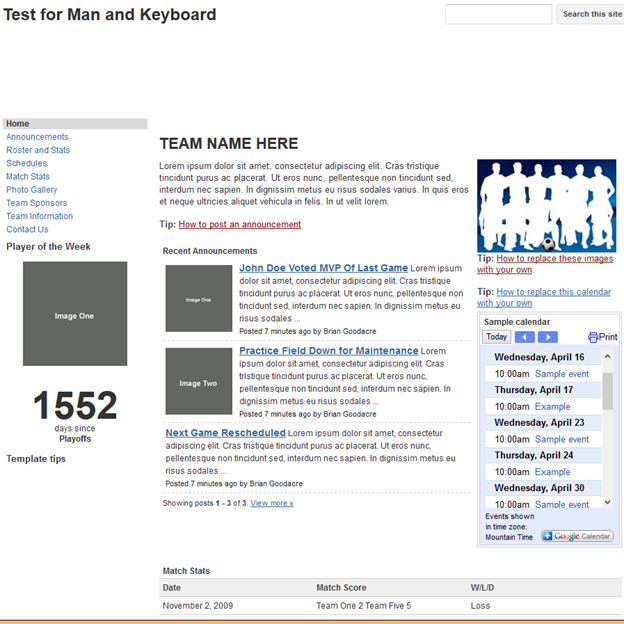
Here is what your website will look like after you remove the soccer related items. Notice there are no soccer balls!

9

Posted in How-To | Tagged , , | 2 Comments

Upgrading from Linux Mint 15 to 16

Logo_Linux_MintUsing Linux Mint 15, I noticed that I was not notified when a newer version of Linux Mint was published. v15 was treating me well but I like to run the latest. A clean install is always an option but I did not want to go through having to reinstall programs and backuping up my files. I found a great post on the blog below that describes how simple terminal commands can be used to upgrade the software. Simply, you are pointing your apt to the newer repositories and doing and update then upgrade.

To expand upon the original author’s methods:

  • Make a backup of your files. This should work but you never know. This should go without saying.
  • Make sure your sudo apt-get update is working properly. If it is failing before you do your update, remove your broken package references. It will avoid future headaches.
  • This is going to take a while. Be ready to let it download and update all your existing packages. It will probably take you 1-2 hours.
  • Monitor it because it will prompt you for input. I always entered ‘Y’ at the prompts.
  • When I ran sudo apt-get upgrade, it gave me 0’s for all the fields. But on restart, Linux Mint 16 was there.

Sources:

Posted in How-To, Linux | Tagged , , , | 1 Comment

Free domains from dot.tk

ImageBuying a domain for a website you only want to play around with can cost you a few bucks along with the hassle of avoiding automatic charges. Getting a free website and hosting from wordpress.com can be quick and easy but it is not the same as having your own domain on the Internet. I found out that there is a top-level domain sponsored by the Government of Tokelau and Teletok that offers free domains and have used their service on multiple sites (like manandkeyboard.tk). Registration is easy for the domain and you can easily point your new URL at your existing website or you can use a service like 000webhost.com that will let you host your own website. The added benefit of setting up a host is that you can make custom emails like your first_name@last_name.tk. With your own domain, you easily impress people by giving out your website or personalized email.

Sources:

Posted in Reviews | Tagged , | Leave a comment

No Highlighting in PowerPoint

I found this out today and it blew my mind. First, go and try to highlight text in PowerPoint like how you can highlight text yellow. You will find there is no highlight text option and even you try to go to advanced Font options, nothing will be there. It must be a design constraint that would affect the way PowerPoint works, but it just seems mind blowing that one cannot highlight text.

Here is the official Microsoft PowerPoint Support page giving a work-around via a filling a box with color and dragging that over text: http://office.microsoft.com/en-us/powerpoint-help/highlight-text-HP001149298.aspx

Posted in Reviews, Windows | Tagged , | 1 Comment

Netflix on Linux

Update! (11/30/2014) Running Netflix in Linux is much easier. More or less, if you have Google Chrome 37 or more, it should run out of the box. Chromium did not work for me but pure breed Chrome did. This just made Linux users lives easier!

Source: http://www.omgubuntu.co.uk/2014/08/netflix-linux-html5-support-plugins


Netflix requires players to use DRM so that they can prevent downloading of videos from Netflix. On Windows, Microsoft Siverlight is used and is run in whatever browser you use. If you try to do the same on Linux though, you will find out that there is no straightforward way to play Netflix. You will be able to see Netflix’s site and manage your Queue, but you cannot play the video. Well, most Linux users with Netflix want to be able to watch Netflix on their computers.

The first approach was to install Netflix Desktop. This was a Firefox browser running on Wine. In my experience, it was choppy and took up too much memory for my liking. It worked for me but I would consider it deprecated now.

The current approach is to use Pipelight. This method is more logical: it installs a Silverlight plug-in into your browser. This way you can go straight to Netflix in your browser and do nothing special when you are in Linux. The install directions are below and were very easy and simple. From my experience it works very well too.

Sources:

Posted in How-To, Linux, Reviews | Tagged , , | Leave a comment

Hard bricking a phone by following an Internet forum

Do not believe everything on the Internet! I learned this the hard way by following a seemingly knowledgeable forum. I modified the installation package that I was using to update my CyanogenMod phone to get past an error. It seemed that the error was rather important because after removing that warning I hard bricked my phone. Not a soft brick, a hard brick. The phone would not turn on. It would not even go into recovery. This was not a fun way to spend a weekend having to switch motherboards with an extra phone my father had that had a busted screen.

I did end this experience with the updated phone but please be careful on the internet!

You can see my response in this post. My username is manandkeyboard. http://forum.xda-developers.com/showthread.php?p=50415110

Posted in CyanogenMod, Reviews, Samsung Galaxy S3 | Tagged , , | Leave a comment

The Agile Samurai Book Review

The Agile Samurai Book Cover

Having taken a graduate course in Agile Methods, The Agile Samurai book ended up being a great refresher for me. Written by Jonathan Rasmusson, an expert in his field and a friend of multiple authors of the Agile Manifesto, Jon does a great job of leading the reader through the agile development cycle. The book is structured so that depending on where the reader is on their current project (starting agile, failing, doing waterfall, testing, etc.) they will gain valuable insights on common pitfalls and recommended suggestions.

The asides in the book are some of my favorite parts because Jon gives a personal example of how an issue being discussed affected one of his past projects. Whether the project failed or he was able to recover it, the asides are what I looked forward to reading.

Jon also included a helpful Sensei and student discussion at the end of each chapter. He had the student at the Sensei a difficult question that the Sensei would reiterate a tenant of agile. The student would still be confused but then the Sensei would clarify allowing the student to ponder the issue further.

The chapters were well organized and written and playful artwork kept the book moving forward. There were example situations with fill-in-the-blanks that some might find helpful but I thought of the answers to myself and moved on.

For the price, it is a good introduction or refresher into all the agile methods, not any particular one. If you are interested in more information, here is the book’s website.

Posted in Reviews | Tagged , , , | Leave a comment

GPG error with public key

When I would run

sudo apt-get update

I would get and error that made using apt-get useless:

Fetched 164 kB in 7s (20.9 kB/s) 
Reading package lists... Done
W: GPG error: http://download.opensuse.org Release: The following signatures couldn't be verified because the public key is not available: NO_PUBKEY 977C43A8BA684223

My first attempt came from the top search result so I figured it would work, but it did not.

gpg --keyserver wwwkeys.eu.pgp.net --recv-keys 977C43A8BA684223

gpg: requesting key BA684223 from hkp server wwwkeys.eu.pgp.net
?: wwwkeys.eu.pgp.net: Host not found
gpgkeys: HTTP fetch error 7: couldn't connect: No such file or directory
gpg: no valid OpenPGP data found.
gpg: Total number processed: 0

I knew I was onto something but that URL seemed like it would not work. I clicked another link and I found the same suggestion but with a new URL for the key and it was successful:

sudo apt-key adv --recv-keys --keyserver keyserver.ubuntu.com 977C43A8BA684223

Executing: gpg --ignore-time-conflict --no-options --no-default-keyring --secret-keyring /tmp/tmp.hm7xQN1vkC --trustdb-name /etc/apt//trustdb.gpg --keyring /etc/apt/trusted.gpg --primary-keyring /etc/apt/trusted.gpg --recv-keys --keyserver keyserver.ubuntu.com 977C43A8BA684223
gpg: requesting key BA684223 from hkp server keyserver.ubuntu.com
gpg: key BA684223: public key "isv:ownCloud OBS Project <isv:ownCloud@build.opensuse.org>" imported
gpg: no ultimately trusted keys found
gpg: Total number processed: 1
gpg: imported: 1

If you are looking at this page and this does not work, look for another key server that hosts the key you are looking for. The goal of of course is for something like this:

sudo apt-get update

...
Fetched 164 kB in 5s (28.0 kB/s)
Reading package lists... Done

Sources:

Posted in How-To, Linux | Tagged | 1 Comment

First day in Bitcoins

Bitcoin started in 2009 and have become more popular and valuable as the years progress. If you want to learn more about Bitcoin, I suggest visiting Wikipedia’s article on Bitcoin or Bitcoin’s homepage and then exploring YouTube for some more information. The cryptography behind Bitcoin is fascinating if you are into that type of thing. This article is about getting started in Bitcoin and Bitcoin mining based on how I got started reading articles on the Internet.

If you just want to invest by buying some bitcoins, you will need a wallet first. Try Bitcoins! is an easy way to get some bitcoins (less than a penny), learn about Bitcoin, and get your wallet set up on CoinBase. Coinbase will host your wallet and let you buy bitcoins from their exchange. You do have to trust them with your bitcoins like any other organization not to steal them. They look to have a good track record of not doing that. If you are not in the USA, check out this link for your other options.

Let’s say you want to get more technical though and you want to host your own wallet. Bitcoin’s webpage has all the good resources and options but I am going to focus on what seems to be the most popular options out there: Bitcoin-qt. The download page comes from Bitcoin’s website. Running right away is simple because the website will provide you the version you need. Windows’s .exe is straightforward. If you download Linux’s .tgz, extract the archive, cd into the extracted folder, look at the README, then cd into your bin/32|64/ folder and execute .bitcoin-qt. The other binary bitcoind is for running the client without a GUI. BE PATIENT. Your wallet will need to sync with the Bitcoin community and this can take days. The progress bar is at the bottom. This is the only boring part of this process!

At this point, your wallet is ready. With this bitcoin-qt program, you can manage your wallet and send/receive funds. That is great but what about mining for bitcoins! There are bitcoins that exist in the world that are free, if you can find them. Finding them are very difficult and will take a lot of expensive hardware if you try alone. Mostly all bitcoin miners join a pool where all the bitcoins found by the group are split based on the amount of shared work everyone did. If you are just starting, you will see you are earning pennies or less than pennies a day, but don’t worry, you can earn more if you want.

The easiest miner program out there is guiminer. If you are running Windows, this is very straight forward to download and run. It needs no further instructions. If you are running Linux, life is a bit tougher because guiminer was developed for Windows so you are going to need to do some playing around. Luckily, this discussion on StackExchange helps with the terminal commands you need to run after downloading the program from the above website. Note that OpenCL and and PyOpenCL are not required to start mining but they will greatly improve your mining results when they are installed. If you hit an error in guiminer about “no module named serial tools,” here is your answer.

The last bit of knowledge you will need is what pool to join. If you want easiest and most popular, go with slush’s pool. It is the default in guiminer and looks to return decent bitcoins on your hardware investment.

Good luck!

Starting points:

Resources:

Posted in Bitcoin, How-To, Reviews | Tagged | Leave a comment